


Policy | Ingestion Review | Search Mapped Fields
Last updated: Nov 02, 2026
4
views


Policy | Ingestion Review | Search Mapped Fields
Modular Solutions | Partner Success | Underwriters
Purpose
Explain the search box on the Ingestion Review panel, which narrows a long list of mapped fields.
Overview
The Ingestion Review panel lists every field ingestion has mapped from the document, which on a full application runs to dozens. A search box above the list narrows it as you type, so a field can be found without scrolling the whole panel.
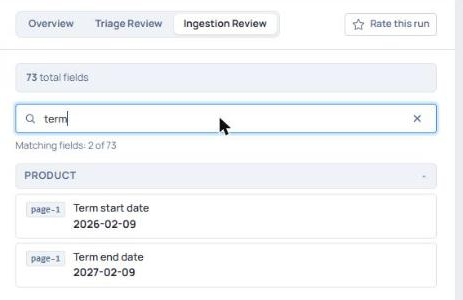
The Ingestion Review panel, filtered by a search on the mapped fields
Expected Behaviour
- The panel opens from the Ingestion Review tab on a submission, beside the document it was read from.
- A count above the search box gives the size of the whole list, reading 73 total fields on the submission used here.
- The box is labelled Search label, short name, path or value, and the search runs against those four.
- As you type, the count under the box reads Matching fields, the number found and the size of the whole list, for example Matching fields: 2 of 73.
- Sections with no match are hidden, and a section holding a match opens itself even if you had collapsed it.
- Where nothing matches, the panel reads No fields match your search.
- Clearing the search with the cross at the end of the box restores the list as you left it, including any sections you had collapsed.
- The panel is read only. A note at the foot reads Read-only, ingestion has applied these fields to the policy.
Steps
- Open the submission and select the Ingestion Review tab.
- Type a label, short name, path or value in the search box.
- Clear the search with the cross at the end of the box to return to the full list.
Notes and Edge Cases
- The search covers the fields ingestion mapped, not the text of the document beside it. A word that appears only in the document returns no match.
Status
Available.
Version / Sprint Reference
Sprint 26M

