


Policy | Submissions | Error Messages in Your Language
Last updated: Nov 02, 2026
4
views


Policy | Submissions | Error Messages in Your Language
Modular Solutions | Partner Success | Underwriters and brokers working with submissions
Purpose
Explain that the error shown on a submission that could not be processed now appears in the language you work in.
Overview
Where a quote document cannot be processed, the message on the submission now reads in the language set on your account rather than in English only. The language is set from your own menu and applies across the submission screens.
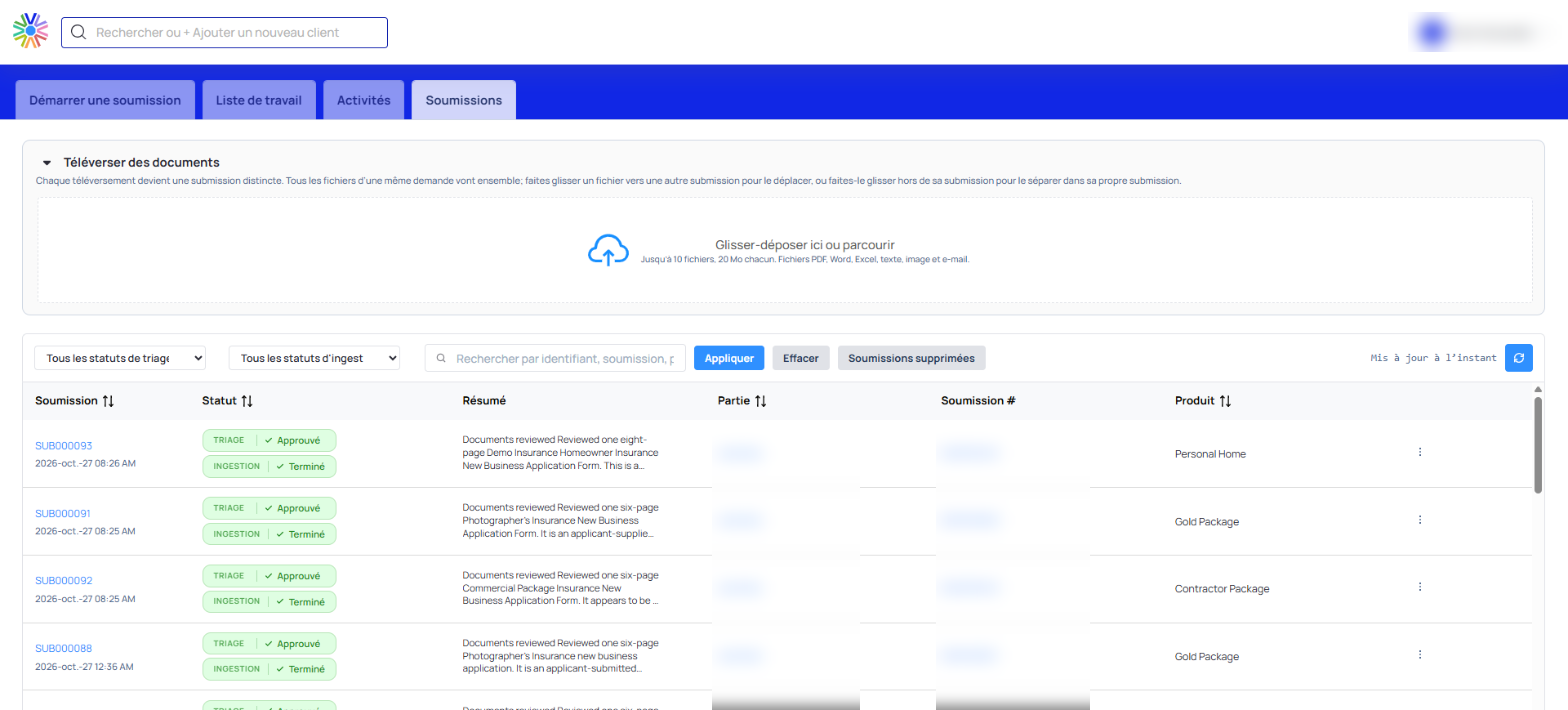
The Submissions screen with the interface language set to French
Expected Behaviour
- The message on a submission that could not be processed reads in the language set on your account.
- The error messages are carried in English, French and Spanish.
- Messages recorded before this change read in your language as well.
- The summary on a submission stays in the language that was in use when the document was ingested, so it does not follow a later change of language.
- Changing the language changes the interface around the submission too. The tab names, the column headings and the triage and ingestion status values all read in the chosen language.
Steps
- Select your name at the top right of the screen.
- Select the language control and choose the language you want.
- Go to Submissions. The screen, its filters and its status values read in that language.
- Open the submission that could not be processed to read the message.
Notes and Edge Cases
- The languages on offer are set for your organisation, so the list in your own menu may be shorter than another organisation's.
- To read a summary in a different language, the submission has to be ingested while that language is in use. Changing language afterwards does not translate a summary that already exists.
- The summary does not come through in Chinese.
Status
Available.
Version / Sprint Reference
Sprint 26M

