


Policy | Document Ingestion | Find Submission Documents in Attachments


Policy | Document Ingestion | Find Submission Documents in Attachments
Modular Solutions | Partner Success | Underwriters
Purpose
Show where the original submission document goes once it has been ingested, so it can be opened from the record rather than hunted for in the submission.
Overview
A document that ingests successfully through triage is now filed in Attachments on its own, with no action from the user. It is listed against the quote that was created from the submission and carries a comment naming the ingestion it came from, so the original application can be opened straight from the record.
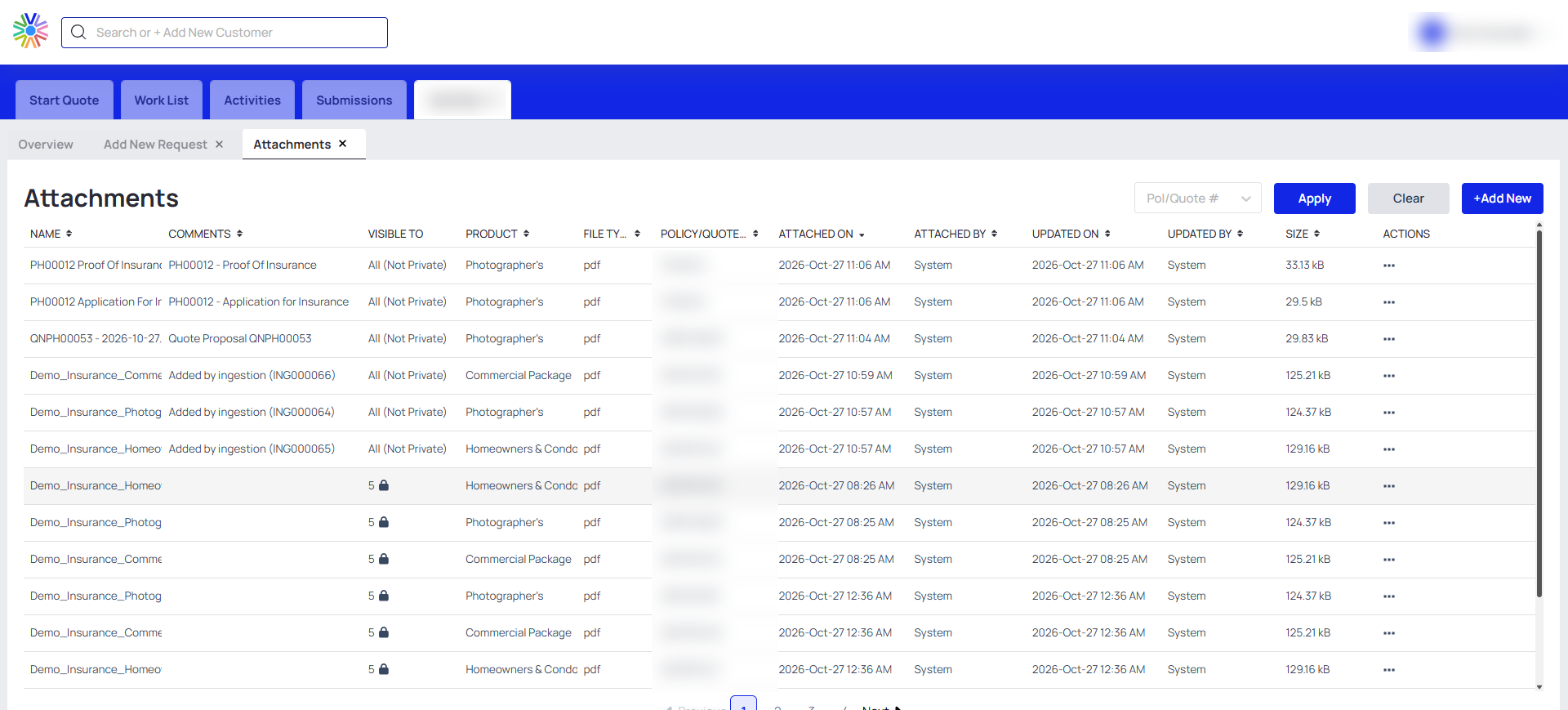
Ingested documents in Attachments, each carrying the ingestion reference in its comment
Expected Behaviour
- Each document that ingests successfully is added to Attachments under its original file name.
- The comment on the attachment reads "Added by ingestion" followed by the ingestion reference in brackets, which ties the file back to the ingestion that created it.
- Policy / quote # carries the number of the quote created from the submission, so the document sits with the work it produced.
- Attached by and Updated by both read System, because the platform files the document rather than a user.
- Visible to reads All (Not Private).
- No action is needed. The document is filed as part of ingestion.
Steps
- Open the record the submission created.
- Go to the Attachments tab.
- Find the row whose comment names the ingestion, and open the document from the actions menu at the end of the row.
Narrowing a long list
- The Attachments panel carries a Pol/Quote # filter with Apply and Clear, which narrows the list to one policy or quote.
- The expand control at the top right of the panel opens Attachments as its own tab, which adds Product, File type, Attached by, Updated on, Updated by and Size to the columns the panel shows.
Notes and Edge Cases
- Documents that fail ingestion are not attached.
- Attachments filed before this change carry no ingestion comment, so an older document is found by its file name and the quote number rather than by its comment.
Status
Available.
Version / Sprint Reference
Sprint 26M

