


Claims | Claim Fees | View Fees on a Claim


Claims | Claim Fees | View Fees on a Claim
Modular Solutions | Partner Success | Claims adjusters, claims managers and finance users
Purpose
Show where to find the fees that have been charged against a claim.
Overview
Where your organisation uses Claim Fees, every fee linked to a claim can be seen from the claim itself, without opening another screen. A Fees tab sits at the end of the panel at the lower right of the claim, alongside Reserves, Payables, Recoveries and Receivables, and lists each fee in one place.
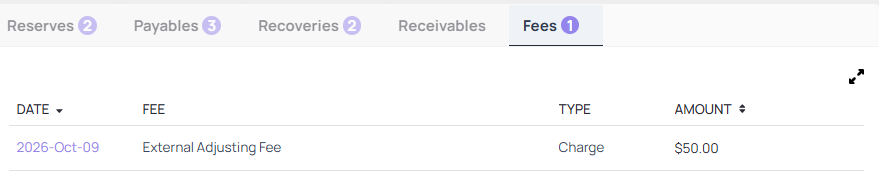
The Fees tab on a claim, after Receivables, listing the fees charged
Expected Behaviour
- The Fees tab sits at the end of the claim's lower right panel, after Reserves, Payables, Recoveries and Receivables, and carries a count of the fees on the claim.
- The panel lists the fees charged on that claim under Date, Fee, Type and Amount. Date and Amount can be sorted, and selecting a column heading makes it the active sort. Fee and Type carry no sort control.
- The tab is read only. Fee rows carry no actions menu, the date is not a link, and there is no control for adding, editing or overriding a fee from this screen.
- Where no fees have been charged, the tab still appears, with no count beside it. The column headings show and the list below them is empty.
Steps
- Open the claim.
- Go to the panel at the lower right of the claim, which carries Reserves, Payables, Recoveries, Receivables and Fees.
- Select the Fees tab to see the fees charged on the claim.
- For the full set of columns, select the expand control at the top right of the panel.
The expanded view
The expand control does more than enlarge the list. It opens Fees as its own tab beside Overview, and that view carries two columns the panel does not show: Charged at status, which records the claim status at the time the fee was charged, and Sales tax.

The expanded Fees view, with Charged at status and Sales tax alongside the panel's columns
Notes and Edge Cases
- Fees cannot be overridden from this screen. Handle any fee correction through your existing process.
- Use the expanded view where you need the sales tax on a fee or the claim status it was charged at, because neither appears in the panel.
- The expanded Fees view opens as a closable tab, so closing it returns you to the claim.
Status
Available. Claim Fees has to be set up for your organisation first. Submit a support request if you do not see the tab.
Version / Sprint Reference
Sprint 26M

